How to get the app
No download page to dig through — buy, check your email, install. Three steps and you're routing SOCKS5.
Pick up a plan
Select any SOCKS5 or residential package on the pricing page and pay in crypto. The moment the network confirms your payment, the balance is live.
Read the email
A note reaches your inbox within minutes with a personal download link and your LunaProxy dashboard sign-in — fully automated, day or night.
Install and go
Launch the installer, log in, choose a target location and connect. Your first SOCKS5 session is up in well under a minute.
Inside the client
A single window to browse the live pool, target a location and connect — here's what the LunaProxy app looks like in practice.

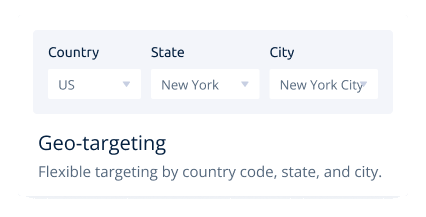
Country, city & ISP targeting
Narrow the pool to a country, state, city, postcode or named ISP without leaving the app, so geo-fenced tasks resolve from a convincing local line.
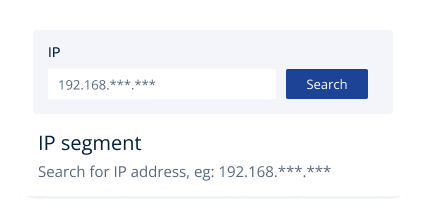
IP-segment lookup
Enter part of an address range and Luna lists matching live endpoints — perfect for keeping a workflow anchored to a single subnet.
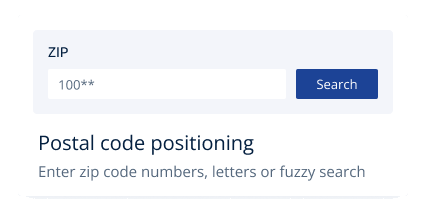
ZIP-level positioning
Type a postal code, whole or partial, and the client places your exit inside that exact area — built for local search audits and regional ad verification.
Why the download is email-only
It's a feature, not a hoop to jump through. Restricting the installer to paying customers protects everyone on the network.
Protects the pool from abuse
An open download invites bot swarms that torch IPs and tank success rates. Releasing it only after purchase keeps Luna's network clean, quick and dependable.
No counterfeit installers
Since the genuine link travels to you by email alone, there's no rogue mirror where a tampered, malware-ridden copy could live. You run precisely what we built.
Cleaner IPs, stronger results
Blocking anonymous downloads slashes the number of wasted addresses — you get higher connection success and fewer blocks from a pool that stays healthy.
The client is optional. Every plan also works as plain SOCKS5 / HTTP(S) credentials on any operating system — macOS, Linux, Android or iOS — straight in your browser, scraper or automation stack.
Get the app with any plan
Pick a plan, pay with crypto, and the download link plus your dashboard login arrive by email in minutes.
View Plans & Pricing →Download & client FAQ
The questions we get most about installing and running the LunaProxy app.
There's no open download link. It's delivered to your email automatically after you purchase any plan — a deliberate step that keeps the pool clean and shuts out trojan-carrying fake mirrors.
Yes, the software is free and included with every plan; you only ever pay for proxy IPs. The smallest plan already unlocks the full client.
The client is a native Windows 10/11 application. On macOS, Linux or mobile you don't need it at all — use the same SOCKS5/HTTP(S) credentials directly in any compatible tool.
Search spam and promotions first. If it still hasn't shown up, reach us on Telegram and we'll resend your download link and dashboard credentials within minutes.
It does — country, state, city, ZIP and ISP selectors are built in, together with IP-segment search, so you get API-grade targeting through a simple interface.